

Text Information
Text information tells drivers what they’re listening to right now.
Make sure your text information:
- Is as relevant as possible to what’s being heard, for example the current song title and artist, or the current programme name
- Can be read and understood quickly at a glance
- Doesn’t duplicate information already shown in the interface, like station name, date, time, or temperature
- Is as short as possible to avoid being scrolled or split across multiple screens on smaller displays
RT+ and DL+: Simple markup for text information
Section titled “RT+ and DL+: Simple markup for text information”You can mark up your text information to help some receivers display it in a more structured format.
For example, the text information:
RT+ and DL+: Structured text information
Section titled “RT+ and DL+: Structured text information”Image showing how a radio view might be marked up to provide these items:
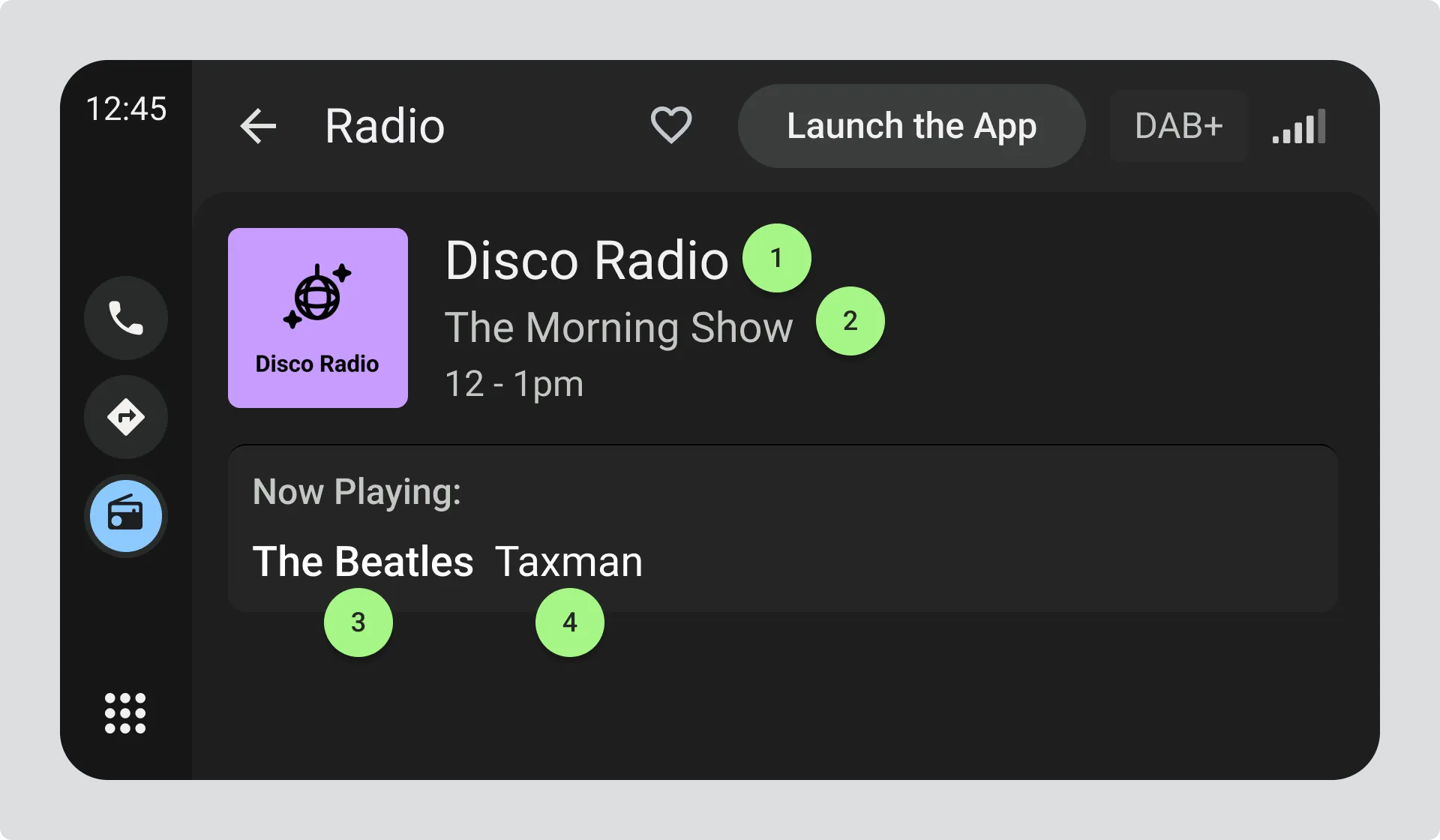
- Radio Station Name = “Disco Radio”
- Programme Name = “The Morning Show”
- Artist = “The Beatles”
- Title = “Taxman”
The full list of available items is specified in TS 102 980 Annex A.
Key considerations for marked-up text
Section titled “Key considerations for marked-up text”- Receiver support varies, so make sure your text information makes sense when presented without markup
- Not all markup tags are supported. Generally artist and title are the most widely supported
- If some of the text is marked up, any text not marked up may be discarded and not shown to the driver
The specific method of marking up text will depend on your broadcast radio system.
Section titled “The specific method of marking up text will depend on your broadcast radio system.”Update frequency
Section titled “Update frequency”Only update text information when you have new, relevant information for drivers. If you try to update more than once every 20 seconds, receivers will discard your updates.
RT+ and DL+: Structured text information
Section titled “RT+ and DL+: Structured text information”You can mark up your text information to help some receivers display it in a more structured format.
Example:
The text “You are listening to The Morning Show on XYZ Radio playing The Beatles and Taxman” might be marked up as:
- Radio Station Name = “XYZ Radio”
- Programme Name = “The Morning Show”
- Artist = “The Beatles”
- Title = “Taxman”
The full list of available items is specified in TS 102 980 Annex A.
Key considerations for marked-up text
Section titled “Key considerations for marked-up text”Receiver support varies, so make sure your text information makes sense when presented without markup. Not all markup tags are supported; generally artist and title are the most widely supported.
Important: If some of the text is marked up, any text not marked up may be discarded and not shown to the driver.
The specific method of marking up text will depend on your broadcast radio system.